

The screen
The bars, the windows and the note beside the mouse.
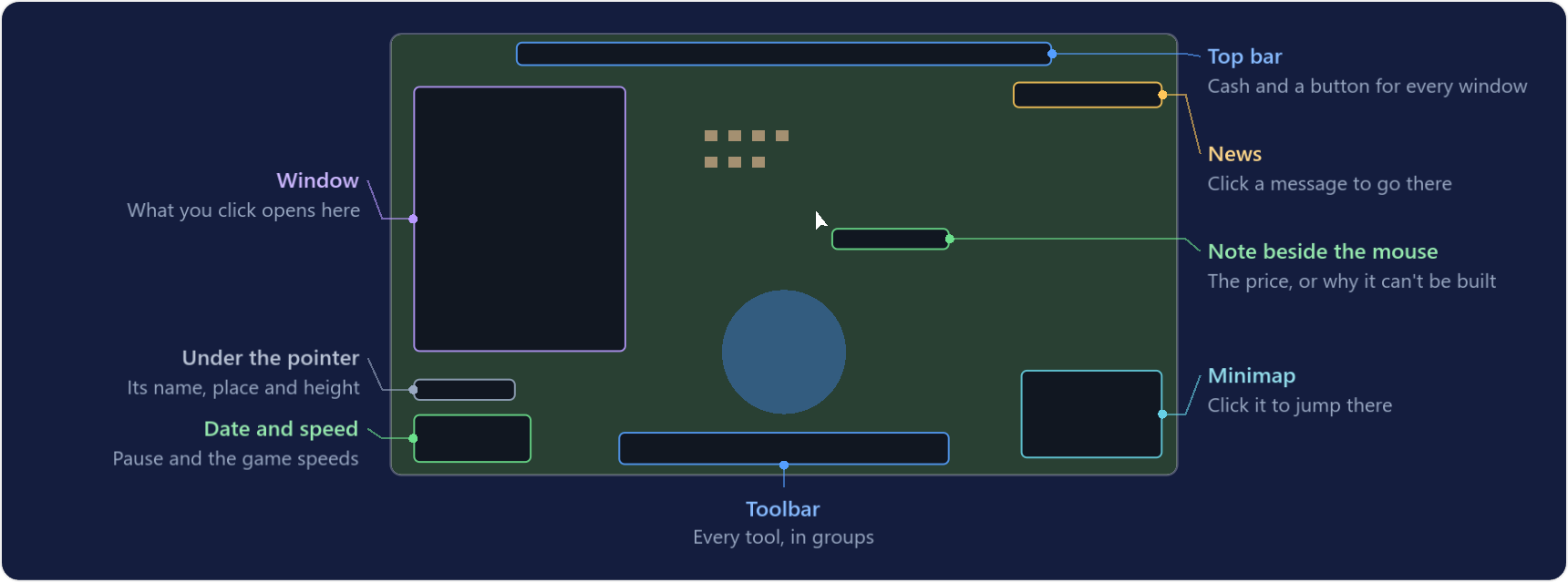
Everything is within reach of three places: the top bar, the toolbar at the bottom and the note that follows the mouse.
| Where | What it does |
|---|---|
| Top bar | Your cash (click it for Finances) and a button for every window. |
| Date and speed | The date in the bottom-left corner, with pause and the game speeds. |
| Toolbar | Inspect, Roads, Railways, Ports, Landscape, Bulldoze, Undo and Vehicle. Choosing a group opens a row of its tools above the bar. |
| Minimap | The whole world in the corner. Click it to jump there. |
| News | Messages about your company appear as things happen. Click one to go to the place it is about; news of goals, subsidies and requests opens Goals. The News window keeps them, and under All news also what rivals and other towns are up to. |
The note beside the mouse
- Before you build it shows the price of one tile of road, track, wires or bridge.
- While you drag it shows the total price and what you are building, in green.
- When something cannot be built it turns red and says why: a building in the way, ground too steep, not enough money, or a council that says no.
Looking at things
- With Inspect (1), click a vehicle, station, industry or building to open its window. Point at anything to see what it is.
- With Inspect, rest the pointer on a station, town name, industry, vehicle or building for a moment and a card beside it gives the key numbers: cargo waiting and ratings, population and what the council thinks of you, what an industry made and how much was carried, a vehicle's load and profit. Settings can switch the cards off.
- With a build tool in hand, the bottom-left corner names what is under the pointer and gives its coordinates and height.
- That window sits on the left. Clicking something else replaces it, and a back arrow in its title bar returns to what you were looking at.
- Screens such as Vehicles, Finances or this guide open one at a time: a new one replaces the last, and pressing a screen's key or button again closes it.
- Press a window's pin to keep it open whatever else you open. Settings has a switch to let every window stay open instead.
- Towns and industries are labelled with small cargo icons: hollow for what they need, filled for what they produce.
- Drag a window by its title bar. Esc closes the one on top.
Lists of what you own
- Vehicles (V) lists your fleet with each vehicle's profit. Sort it by Needs attention to see the ones in trouble first.
- Stations (Ctrl+S) lists every station with what is waiting there and its ratings.
- Lines (Ctrl+L) lists your lines with their stops, vehicles and profit. See Lines.
- Problems (I, the warning sign, with a count) lists everything that is stuck or going wrong, each with why and a button that fixes it or takes you there.
- In these lists, click a row to open it, or its target button to see it on the map. In Problems, a click on a row shows the place and the button beside it fixes it.
- Goals (J, the flag) holds your first steps, your achievements, how near your company goal is and the subsidies and town requests on offer. See Goals & achievements.
Saving
- F5 saves at once and F9 loads that save again.
- The game menu (Esc) saves under a name of your choice and loads any saved game.
- The game also saves by itself, every three months unless you change it in Settings.
Every shortcut is on Controls.